

Creative Music production and DJ app for Mac
ChordProEditor [C]
by Kevin Haglund
- Price
- Free
- Platforms
- Mac
- Requires
- macOS 14.0+
- Updated
- 15 Jun 2026





Overview
From the developer's App Store description:
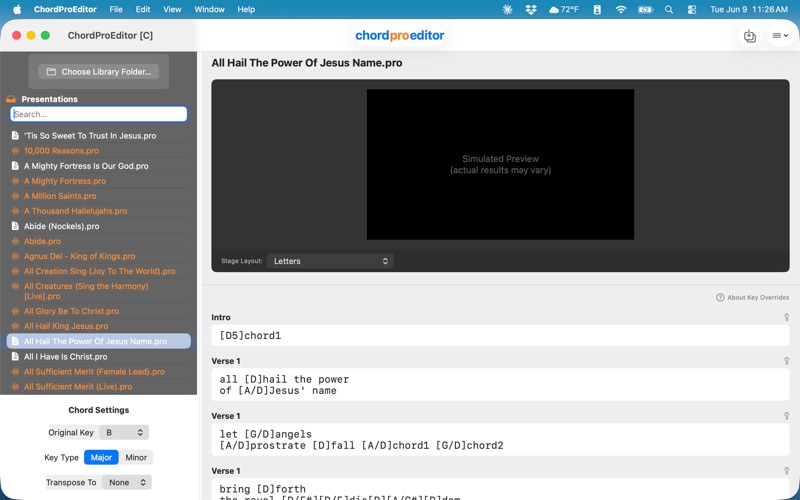
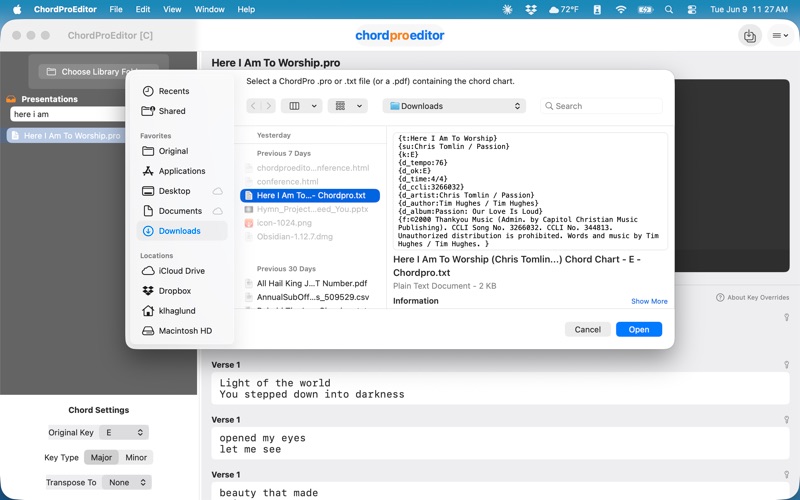
ChordProEditor is the first and only macOS app that allows you to load, edit, and enhance your ProPresenter .pro files with ChordPro-formatted chords. Worship leaders, music directors, and church tech teams can now add or edit chords directly in their existing presentations, enabling the addition of chords to existing presentations for viewing on a separate stage display, while keeping the lyrics clean and readable for the congregation.
ChordProEditor [C] is a music production and DJ app by Kevin Haglund for Mac. It needs macOS 14.0 or later.
Price and purchases
ChordProEditor [C] is free to download from the App Store.
Price from the App Store, checked 12 Nov 2026. Prices and purchases change; check the App Store before you buy.
Facts
- Price
- Free
- Requires
- MacOS 14.0 or later
- Version
- 2.1.1
- Last updated
- 15 Jun 2026
- Size
- 8 MB
- Age rating
- 4+
- First released
- 23 Sept 2025
- App Store category
- Utilities
From the App Store listing, checked .
What's new in version 2.1.1
Version 2.1.1 This update includes several important bug fixes to improve reliability and accuracy when working with ProPresenter files. Bug Fixes • Fixed an issue where importing a ChordPro chord chart would replace all lyrics with placeholder text on every slide. Lyrics were never lost — ChordProEditor simply couldn't see them under certain ProPresenter templates. This has been resolved and chord charts now import correctly regardless of which template is applied. • Fixed an issue where chord replacements made using Find & Replace would appear correct in ChordProEditor but silently revert after saving. Chord changes now persist correctly to the ProPresenter file. • Fixed an issue where ChordProEditor could alter the font, size, color, and alignment of the main audience display in ProPresenter after importing a chord chart. ChordProEditor is designed to be completely non-destructive to your presentation's look, and this fix ensures that remains true. • Fixed a display inconsistency where replacing a chord with a flat (e.g. Bb) would show its enharmonic equivalent (e.g. A#) in the ChordProEditor interface instead.
From the developer's App Store release notes.
Alternatives to ChordProEditor [C]
Other music production and DJ apps for Mac, by App Store chart ranking.




Details
- Developer
- Kevin Haglund ↗
- Category
- Music production and DJ
- Website
- chordproeditor.com