

Mac utilities and customization Clipboard and automation app for Mac
ClipBoardy
by Tristan Jarrett
- Price
- Free
- Platforms
- Mac
- Requires
- macOS 14.0+
- Updated
- 6 Nov 2026



Overview
From the developer's App Store description:
ClipBoardy is a fast, private clipboard manager for macOS that keeps everything you copy exactly where you need it, ready instantly without breaking your focus. Whether it's text, links, images, files or code, ClipBoardy remembers what you copy so you can search it, reuse it and move on.
ClipBoardy is a clipboard and automation app by Tristan Jarrett for Mac. It needs macOS 14.0 or later.
Price and purchases
ClipBoardy is free to download from the App Store.
Price from the App Store, checked 12 Nov 2026. Prices and purchases change; check the App Store before you buy.
Facts
- Price
- Free
- Requires
- MacOS 14.0 or later
- Version
- 2.1.0
- Last updated
- 6 Nov 2026
- Size
- 6 MB
- Age rating
- 4+
- First released
- 12 May 2025
- App Store category
- Productivity
- Also listed in
- Utilities
From the App Store listing, checked .
What's new in version 2.1.0
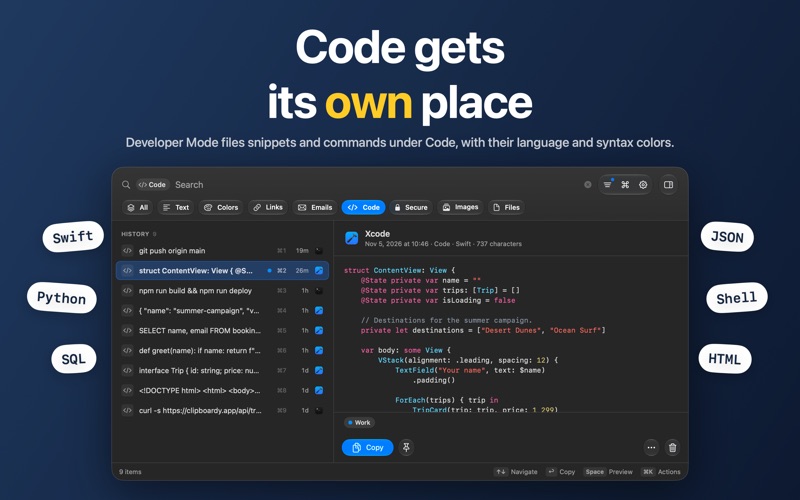
A new icon, easier-to-read code, and a history window that's quicker to use from the keyboard. • A new app icon: a yellow Mac key, or a dark key in dark mode. • Syntax highlighting in Developer Mode: code is now colored in previews and the editor, for Swift, Python, JavaScript, TypeScript, JSON, SQL, HTML, XML and Shell. • Large code items now open and scroll smoothly. • Filter code by language with search shortcuts like code:Swift (Pro). • Keyboard focus now moves between search and the list, with a new cheat sheet of keyboard shortcuts. • ⇧-click now selects a range from a fixed starting point. • Tag several items at once (Pro), and the actions button stays available while several items are selected. • Copy Email Address for mailto: items gives you the address without "mailto:". • Opening the Trash now shows everything in it, and leaving brings back your history filters. • Clearer buttons in the editor and its save prompt, plus a tidier header and search field.
From the developer's App Store release notes.
Alternatives to ClipBoardy
Other clipboard and automation apps for Mac, by App Store chart ranking.




Details
- Developer
- Tristan Jarrett ↗
- Category
- Clipboard and automation
- Website
- clipboardy.app