Creative Video editing app for Mac
DaVinci Resolve Studio
by Blackmagic Design Inc
- Price
- Paid (£229.99 in the UK App Store)
- Platforms
- Mac
- Requires
- macOS 15.0+
- Updated
- 6 Nov 2026


Overview
From the developer's App Store description:
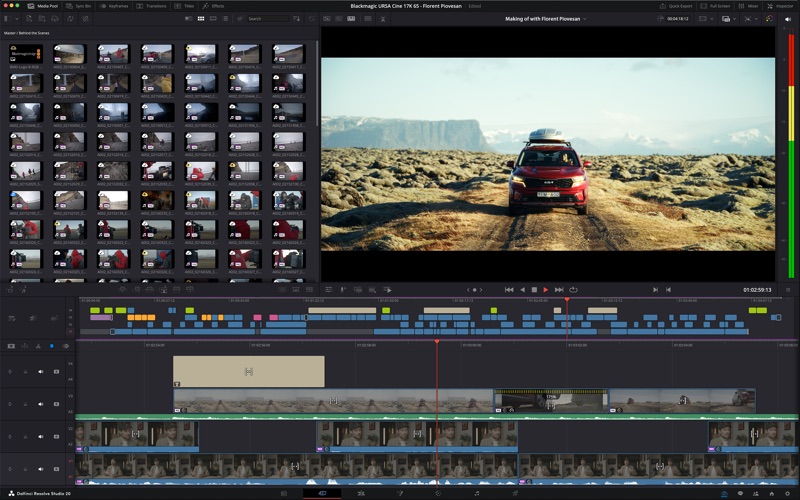
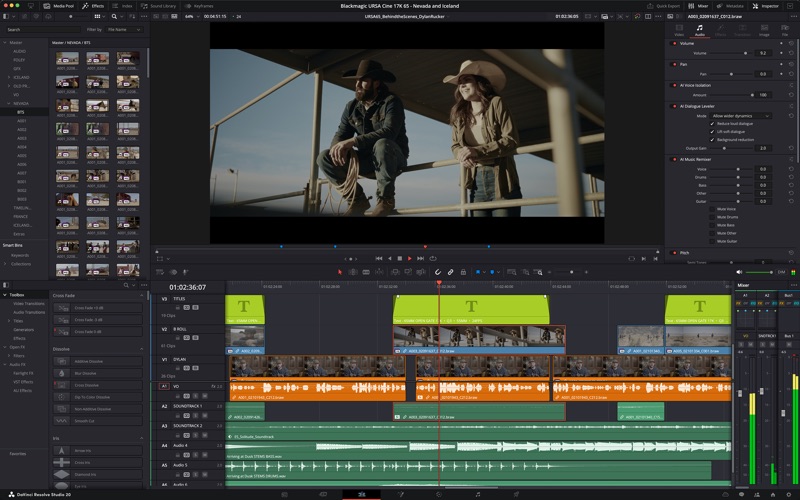
Hollywood’s most powerful tools for professional editing, color correction, audio post and visual effects! DaVinci Resolve Studio is the world’s only solution that combines professional editing, color correction, visual effects and audio post production all in one software tool! You can instantly move between editing, color, effects, and audio with a single click.
DaVinci Resolve Studio is a video editing app by Blackmagic Design Inc for Mac. It needs macOS 15.0 or later.
Price and purchases
DaVinci Resolve Studio is a paid app: £229.99 in the UK App Store. US pricing may differ.
Price from the App Store, checked 12 Nov 2026. Prices and purchases change; check the App Store before you buy.
Facts
- Price
- Paid (£229.99 in the UK App Store)
- Requires
- MacOS 15.0 or later
- Version
- 21.2
- Last updated
- 6 Nov 2026
- Size
- 6.7 GB
- Age rating
- 4+
- First released
- 17 Dec 2015
- App Store category
- Photo & Video
- Also listed in
- Graphics & Design
From the App Store listing, checked .
What's new in version 21.2
• Support for Apple MacBook Pro with PROLED XDR touch screens. • Support for Blackmagic Design Gen 6 LUTs. • ResolveFX False Color support for Gen 5 and Gen 6 color science. • Extracted audio files now retain source timecode. • Multicam clips now open as source clips in source timelines. • Open in Timeline with Source Viewer supports clips and multicams. • Menu action and shortcut to restore last active edit points. • Command or Ctrl marquee selection now uses last edit point type. • Conform lock multiple timeline clips to one media pool clip. • Convert in out to compound clip replaces clips in situ. • Separate context action to create compound clip from in out range. • Stop playback option applies to playhead nudges and mouse clicks. • Edit menu options now persist after UI layout reset. • Support for EXIF metadata in PNG files. • Improved AI assistant color and Fusion capabilities. • AI assistants can download extras needed for advanced features. • AI assistants can export frames or order thumbnails as grid. • Multiple scripting API improvements. • Addressed network drive audio issues for some MXF clips. • Addressed slow MP3 audio only renders. …
From the developer's App Store release notes.
Alternatives to DaVinci Resolve Studio
Other video editing apps for Mac, by App Store chart ranking.


Details
- Developer
- Blackmagic Design Inc ↗
- Category
- Video editing, Photo editing
- Website
- blackmagicdesign.com