

Learning, social and lifestyle Travel and navigation app for Mac
Disk Map
by FIPLAB Ltd
- Price
- Paid (£5.99 in the UK App Store)
- Platforms
- Mac
- Requires
- macOS 12.4+
- Updated
- 16 Feb 2026



Overview
From the developer's App Store description:
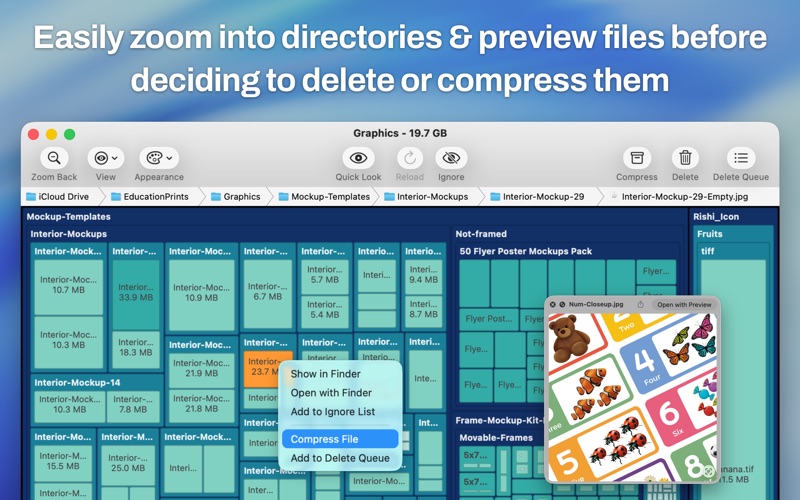
Disk Map makes it easy to visualize the files and folders that are cluttering up all your internal and external storage drives. It enables you to quickly locate, delete or compress large files and folders and reclaim tons of valuable space. The app quickly scans your drives to build a stunning visual treemap display of files and folders on your hard drive, allowing you to easily navigate through your file system and find out what is taking up the most disk space.
Disk Map is a travel and navigation app by FIPLAB Ltd for Mac. It needs macOS 12.4 or later.
Price and purchases
Disk Map is a paid app: £5.99 in the UK App Store. US pricing may differ.
Price from the App Store, checked 12 Nov 2026. Prices and purchases change; check the App Store before you buy.
Facts
- Price
- Paid (£5.99 in the UK App Store)
- Requires
- MacOS 12.4 or later
- Version
- 2.81
- Last updated
- 16 Feb 2026
- Size
- 6 MB
- Age rating
- 4+
- First released
- 20 Oct 2013
- App Store category
- Utilities
- Also listed in
- Business
From the App Store listing, checked .
What's new in version 2.81
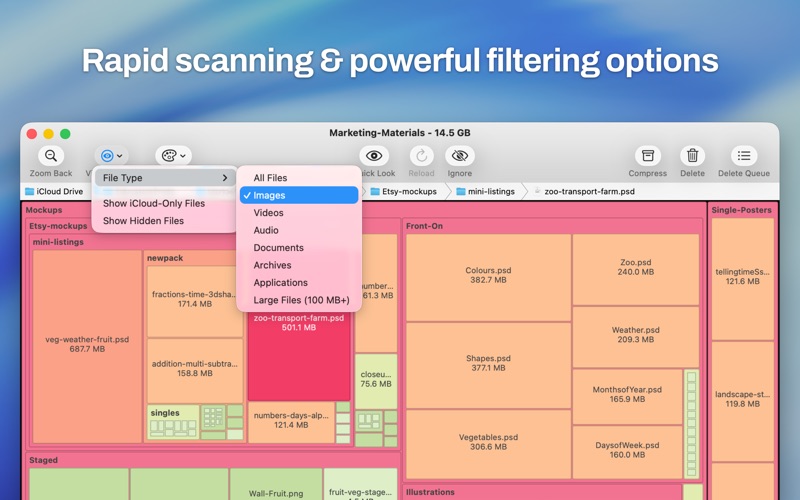
- Small UI bug fix for older macOS versions Previous update release notes: Our HUGE macOS Tahoe update! Details below: New Themes & Visualisation • 5 new colour themes: Heatmap, Ocean, Forest, Lavender, and Matrix • Color files by age (Date Modified or Date Created) to quickly spot old files eating up space • On-screen colour legend tooltip, so you always know what the colours mean Smarter Filters • Filter by file type (Images, Videos, Audio, Documents, Archives, Code, or Applications) • Quickly toggle hidden files and iCloud-only files from the toolbar Safer Deletions • Warnings before permanently deleting iCloud files (which removes them from all your devices) • Warnings before deleting files on network drives (which cannot be recovered from Trash) Performance & Polish • Much faster scanning with reduced memory usage • Modern toolbar with cleaner layout • Less intrusive confirmation dialogs • Ignoring large files now immediately shrinks their parent folder in the map • Minimum file size filter now works correctly when changing units Min version is now macOS 12.4 or later. Please leave us a review if you love the update!
From the developer's App Store release notes.
Alternatives to Disk Map
Other travel and navigation apps for Mac, by App Store chart ranking.



Details
- Developer
- FIPLAB Ltd ↗
- Category
- Travel and navigation
- Website
- fiplab.com


