

Productivity and work Productivity app for iPhone
fieldwork
by William Rice
- Price
- Paid (CA$12.99 in the Canadian App Store)
- Platforms
- iPhone
- Requires
- iOS 16.4+
- Updated
- 9 Nov 2026



Overview
From the developer's App Store description:
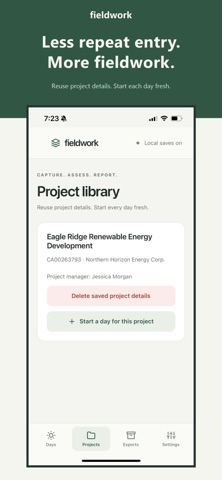
Field notes. Finished reports. Fieldwork is a field engineering app that turns your site day into professional documents, right on your iPhone. Complete your risk assessment, daily report and site photos on site, then export everything as PDF, Word and ZIP.
fieldwork is a productivity app by William Rice for iPhone. It needs iOS 16.4 or later.
Price and purchases
fieldwork is a paid app: CA$12.99 in the Canadian App Store. US pricing may differ.
Price from the App Store, checked 12 Nov 2026. Prices and purchases change; check the App Store before you buy.
Facts
- Price
- Paid (CA$12.99 in the Canadian App Store)
- Requires
- IOS 16.4 or later
- Version
- 1.0.3
- Last updated
- 9 Nov 2026
- Size
- 53 MB
- Age rating
- 4+
- First released
- 7 Nov 2026
- App Store category
- Productivity
- Rating count
- 2 ratings on the App Store
From the App Store listing, checked .
What's new in version 1.0.3
What's new in Fieldwork 1.0.3 • Time tab: See hours by day and by project from your report times, with a monthly calendar and filters. Fatigue & overtime requests now live here too, and you can hide them in Settings if you don't use them. • Export several days at once: Pick days and Fieldwork exports them one after another, then share all the ZIPs in one go. • Daily summary: Create a short email summary from the General and Report tabs. You can change its layout, and each project can have its own. • Multiple templates: Keep several document templates with your own name and logo, and choose which project uses which. You can duplicate a template, or share one and import it on another device. • Move to a new phone: Copy all your days, projects, photos and settings to another phone. • Better photo tools: A new in-app camera with optional haptics, and a "Faster sharing" export size for smaller files. In the photo viewer you can now rotate a photo, hide the details overlay, and edit the comment that appears in the report. • General fixes and performance improvements.
From the developer's App Store release notes.
Alternatives to fieldwork
Other productivity apps for iPhone, by App Store chart ranking.


Details
- Developer
- William Rice ↗
- Category
- Productivity
- Website
- mayorice.github.io