

Learning, social and lifestyle Social and messaging app for iPhone
OpLine
by Justin Calvert
- Price
- $6.99
- Platforms
- iPhone
- Requires
- iOS 17.0+
- Updated
- 11 Nov 2026
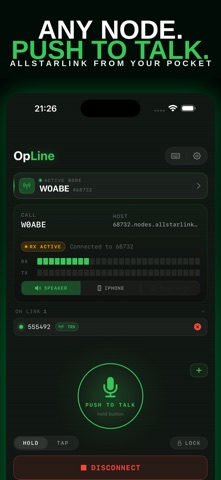
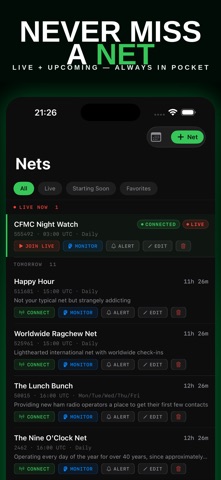
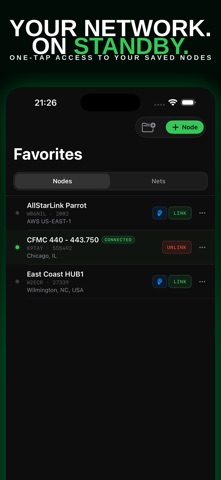
Overview
From the developer's App Store description:
OpLine - AllStarLink in Your Pocket. Connect to AllStarLink nodes anywhere your iPhone has signal. OpLine is a fast, native iOS client for licensed amateur radio operators who want a clean, reliable way to get on the network without desktop tools or generic SIP clients.
OpLine is a social and messaging app by Justin Calvert for iPhone. It needs iOS 17.0 or later.
Price and purchases
OpLine costs $6.99 on the App Store.
Price from the App Store, checked 12 Nov 2026. Prices and purchases change; check the App Store before you buy.
Facts
- Price
- $6.99
- Requires
- IOS 17.0 or later
- Version
- 1.7
- Last updated
- 11 Nov 2026
- Size
- 10 MB
- Age rating
- 9+
- First released
- 8 Jun 2026
- App Store category
- Social Networking
- Also listed in
- Utilities
- Rating count
- 4 ratings on the App Store
From the App Store listing, checked .
What's new in version 1.7
OpLine 1.7 brings a desk layout for iPad and Mac, iCloud sync across your devices, cleaner receive audio, and a long list of fixes from the people testing it. IPAD AND MAC - A sidebar with Connect, Nets, Favorites and Pulse, your saved nodes under them, and today's nets in a panel on the right. - At a desk, the transmit block sits beside the connection cards and the Pulse map or list fills the width below. - Keyboard: Command-1 to 4 switch screens, Command-F finds a node, Command-comma opens Settings, and the space bar keys the node. - iPhone Duo: the system tab bar, folded and unfolded, and a Connect screen that fits without scrolling. ICLOUD SYNC - Favorites, nets, your nodes and your settings follow you across your own devices, with no account to make. Node passwords travel in iCloud Keychain; the OpLine server never sees any of it. The switch is in Settings. AUDIO AND CONNECTIONS - Received audio is decoded correctly at last: the quiet buzz under every transmission is gone, lost packets are concealed quietly, and every over starts and ends with a fade. - Audio comes back after a phone call, Siri or an alarm. The call stays connected and a banner says so. …
From the developer's App Store release notes.
Alternatives to OpLine
Other social and messaging apps for iPhone, by App Store chart ranking.


Details
- Developer
- Justin Calvert ↗
- Category
- Social and messaging
- Website
- opline.app