

Learning, social and lifestyle Travel and navigation app for Mac
Ultra Character Map
by X04 Studios Inc.
- Price
- $9.99
- Platforms
- Mac
- Requires
- macOS 10.14.6+
- Updated
- 8 Jul 2024


Overview
From the developer's App Store description:
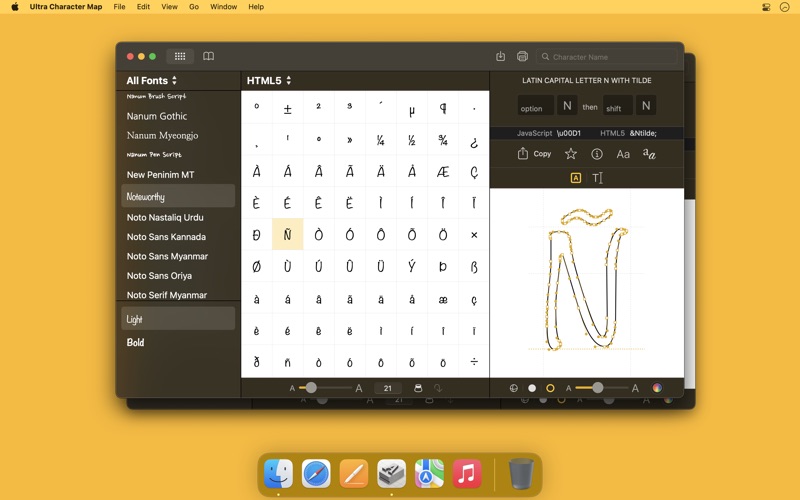
Not just another character map. (Really. Did you know that many fonts contain characters and pictures that cannot be accessed with the keyboard or even with a regular character palette? Ultra Character Map lets you access any character or glyph in any font and use it in other apps.
Ultra Character Map is a travel and navigation app by X04 Studios Inc. for Mac. It needs macOS 10.14.6 or later.
Heads up: Ultra Character Map has not had an App Store update since 8 Jul 2024. Apps that go this long without updates may not work well on the latest macOS or iOS.
Price and purchases
Ultra Character Map costs $9.99 on the App Store.
Price from the App Store, checked 12 Nov 2026. Prices and purchases change; check the App Store before you buy.
Facts
- Price
- $9.99
- Requires
- MacOS 10.14.6 or later
- Version
- 2.3
- Last updated
- 8 Jul 2024
- Size
- 21 MB
- Age rating
- 4+
- First released
- 22 May 2012
- App Store category
- Utilities
- Also listed in
- Graphics & Design
From the App Store listing, checked .
What's new in version 2.3
- Performance improvements. - Other minor improvements. Introduced in Version 2.2 - Quickly zoom in on the character map using the new Macro button. - Easily generate a web page from the character map. - Get any character’s JavaScript escape sequence and easily copy it to the clipboard. Introduced in Version 2.1 - Supports Dark Mode. - Quickly select and compare fonts using the new Selected Fonts collection. - View alternate characters and glyphs associated with the selected character. - Copy characters and glyphs to the clipboard as SVG pictures. - Set the character map sidebar font size. - Supports color SVG fonts under macOS 10.14 Mojave. Introduced in Version 2.0 - Enjoy a simplified, completely redesigned user interface. - Create your own clip art by applying colors and 3D effects to any character, symbol or glyph. - Quickly browse through your font library with the new font grid. - Explore your fonts' characters and glyphs at the same time in the new unified “Characters & Glyphs” view. - Get any character's Swift or Objective-C escape sequence or UTF-8 byte sequence and easily copy it to the clipboard. - Browse the available variants of the selected Emoji character. …
From the developer's App Store release notes.
Alternatives to Ultra Character Map
Other travel and navigation apps for Mac, by App Store chart ranking.



Details
- Developer
- X04 Studios Inc. ↗
- Category
- Travel and navigation, Graphic design
- Website
- x04studios.com