

Mac utilities and customization File management app for Mac
ZipMaster
by 建忠 李
- Price
- Free
- Platforms
- Mac
- Requires
- macOS 12.0+
- Updated
- 9 Nov 2026



Overview
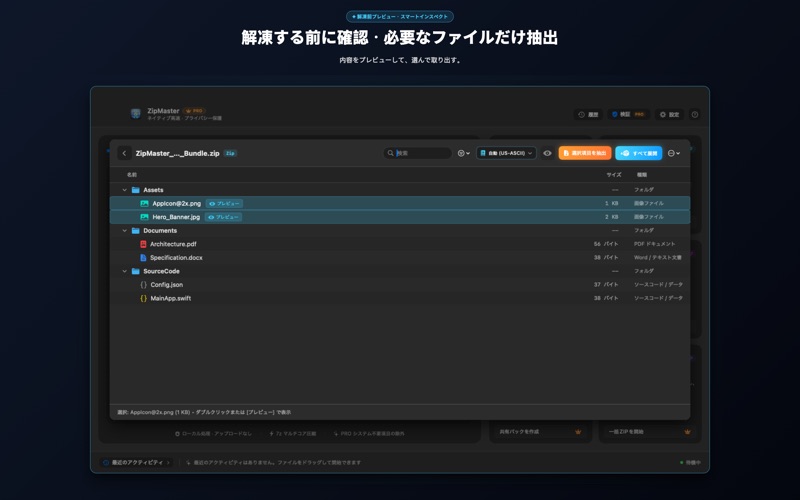
ZipMaster is a file management app by 建忠 李 for Mac. It needs macOS 12.0 or later.
Price and purchases
ZipMaster is free to download from the App Store.
Price from the App Store, checked 12 Nov 2026. Prices and purchases change; check the App Store before you buy.
Facts
- Price
- Free
- Requires
- MacOS 12.0 or later
- Version
- 1.6
- Last updated
- 9 Nov 2026
- Size
- 25 MB
- Age rating
- 4+
- First released
- 25 Sept 2026
- App Store category
- Utilities
- Also listed in
- ユーティリティ, 仕事効率化
From the App Store listing, checked .
What's new in version 1.6
ZipMaster 1.6 では、デザインと操作性を全面的に刷新しました: • ライト&ダークモードに完全対応:従来のダークモード固定を撤廃し、macOS の外観モード(ライト/ダーク)にシームレスに適応。洗練されたシステムマテリアルを採用しました。 • ヘルプ&ショートカットセンター新設(⌘?):ショートカットキーでいつでも呼び出し可能。60種類以上の対応形式一覧、セキュリティ保護仕様(ZipSlip防止など)、便利なテクニックを検索・確認できます。 • ネイティブキーボード操作:⌘O(展開)、⌘N(圧縮)、⌘,(設定)、⌘Y(履歴)、Esc(シート・パネルを閉じる)など、すべての主要操作をキーボードだけで軽快に行えます。 • クリップボードのアーカイブ自動検知:Finderで圧縮ファイルをコピーすると、メイン画面にフローティングピルが表示され、ドラッグ不要で即座に展開できます。 • パスワードの安全性とプライバシー向上:パスワード一覧をデフォルトでマスク表示にし、ワンタップで表示切替やコピーが可能。履歴保存もバックグラウンド非同期化でより軽快に。 • わかりやすいエラー復旧案内:エラー発生時も単なるエラー表示にとどまらず、再試行や別フォルダの選択など具体的な解決手順をご案内します。
From the developer's App Store release notes.
Alternatives to ZipMaster
Other file management apps for Mac, by App Store chart ranking.


Details
- Developer
- 建忠 李 ↗
- Category
- File management
- Website
- zipmaster.cn
