

Developer Coding and developer app for Mac
Pipeline Lens
by Wen Duan
- Price
- Free
- Platforms
- Mac
- Requires
- macOS 14.0+
- Updated
- 10 Nov 2026


Overview
From the developer's App Store description:
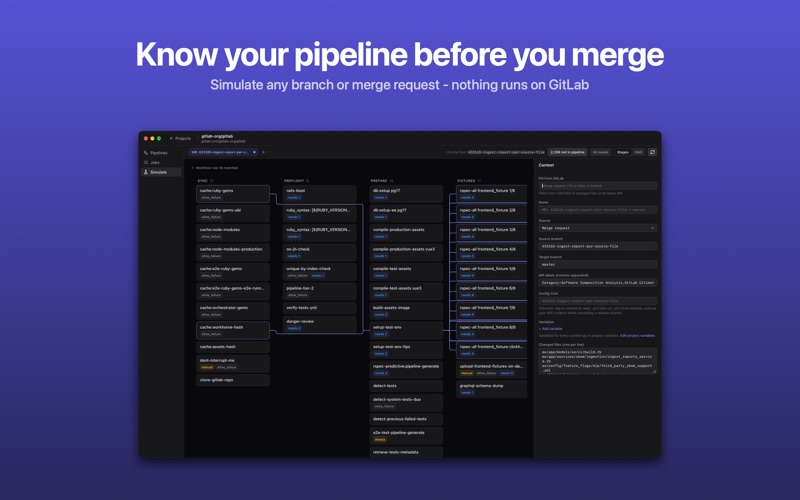
Your GitLab CI, explained. Every job, every rule, every what-if. Pick a branch, tag or merge request and Pipeline Lens works out which jobs would run, in which stages, and what each one needs - without running a pipeline.
Pipeline Lens is a coding and developer app by Wen Duan for Mac. It needs macOS 14.0 or later.
Price and purchases
Pipeline Lens is free to download from the App Store.
Price from the App Store, checked 12 Nov 2026. Prices and purchases change; check the App Store before you buy.
Facts
- Price
- Free
- Requires
- MacOS 14.0 or later
- Version
- 1.1.0
- Last updated
- 10 Nov 2026
- Size
- 1 MB
- Age rating
- 4+
- First released
- 3 Nov 2026
- App Store category
- Developer Tools
- Also listed in
- 開発ツール
From the App Store listing, checked .
What's new in version 1.1.0
• Feature: See what a config change does on another branch before it's merged - Config from in Simulate reads .gitlab-ci.yml from one branch, such as your merge request's, while simulating the pipeline of another, such as a release branch. Switching a merge request filled from GitLab to a branch pipeline keeps its config. • Improvement: A calmer project window. The top bar only shows the project; Simulate's view controls sit next to its tabs, and Sync sits next to the sync status. A dot on a tab marks unsaved changes - click it or press ⌘S to save. Project variables are edited from the Context panel.
From the developer's App Store release notes.
Alternatives to Pipeline Lens
Other coding and developer apps for Mac, by App Store chart ranking.


Details
- Developer
- Wen Duan ↗
- Category
- Coding and developer
- Website
- monk-studio.com