Creative Graphic design app for Mac
SimpleCAD2
by Tien Thinh Vu
- Price
- Free
- Platforms
- Mac
- Requires
- macOS 11.0+
- Updated
- 31 Oct 2024


Overview
From the developer's App Store description:
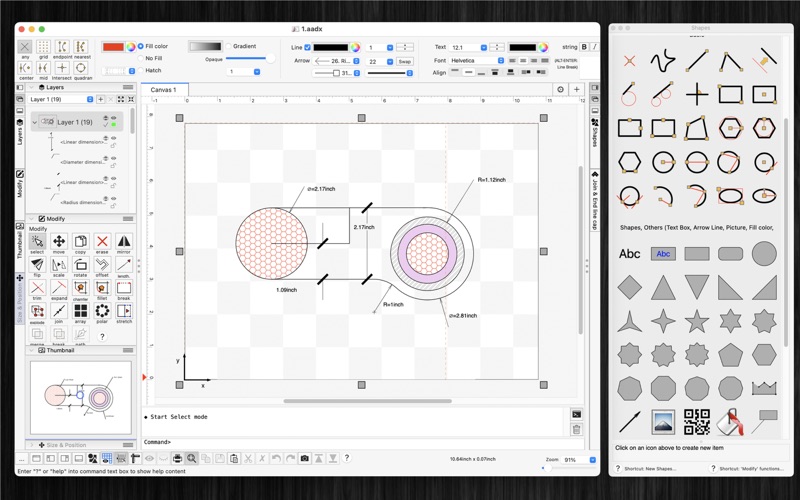
This is the Pro version of SimpleCAD. SimpleCAD2 is an easy, simple to learn 2D Computer Aided Design program (CAD) made to meet all of your basic design needs. SimpleCAD2 is more than just a vector paint program, because you could move, copy, edit, scale, rotate and offset… objects. (* Number of objects/shapes added to each document is limited, you could upgrade to Pro-Version to remove this limitation. *).
SimpleCAD2 is a graphic design app by Tien Thinh Vu for Mac. It needs macOS 11.0 or later.
Heads up: SimpleCAD2 has not had an App Store update since 31 Oct 2024. Apps that go this long without updates may not work well on the latest macOS or iOS.
Price and purchases
SimpleCAD2 is free to download from the App Store.
Price from the App Store, checked 12 Nov 2026. Prices and purchases change; check the App Store before you buy.
Facts
- Price
- Free
- Requires
- MacOS 11.0 or later
- Version
- 2.7
- Last updated
- 31 Oct 2024
- Size
- 14 MB
- Age rating
- 4+
- First released
- 7 Nov 2020
- App Store category
- Graphics & Design
- Also listed in
- Productivity
From the App Store listing, checked .
What's new in version 2.7
- Improve UI - Fix bugs Previous updates: - Support "BLOCK" - Add "Insert" command to insert block into drawing - Allow to edit single item inside its group - Support macOS 13 Ventura - Allow modify functions (copy, trim..) to change objects from multiple layers - Allow modify functions (copy, trim..) to accept "right-click on mouse" as "press-ENTER" - Allow modify functions (copy, trim..) to accept undo/redo functions - Allow to change order of Inspector-views on left/right sides of document window - Support tree-view of all objects (via "Layers" Inspector-view) - Allow to import/export custom favorite shapes - Allow to find/replace string inside shapes - Add shortcut: hold SPACE key then move mouse to maneuver around document
From the developer's App Store release notes.
Alternatives to SimpleCAD2
Other graphic design apps for Mac, by App Store chart ranking.


Details
- Developer
- Tien Thinh Vu ↗
- Category
- Graphic design
- Website
- vutienthinh.wordpress.com